Platform on concrete and steel in construction

Matrix Software understands that efficiency and collaboration are crucial in the world of structural design. “That's why we've developed a powerful API for MatrixFrame/MatrixTools and FEM-Design, enabling robust integration between our software and widely used platforms such as Revit, Tekla, Excel, Grasshopper, Rhino, and Dynamo,” says account manager Shahram Omary. “This interoperability enables engineers and designers to streamline their workflows, increase productivity, and improve the reliability of their processes.”
“Our API makes it possible to easily exchange data and models between MatrixFrame/MatrixTools and other software applications,” says Omary. “This significantly reduces the risk of errors and speeds up the project cycle. Whether you work with BIM platforms such as Revit, process data in Excel, or create designs with Grasshopper and Dynamo, our API ensures that the various systems communicate smoothly with each other.”
With the MatrixFrame-Revit integration, for example, you can easily export data from a Revit model to MatrixFrame for structural analyses. “This is done using the Revit API and a fully automated link, which ensures that model information such as geometry, loads, and material parameters is transferred to MatrixFrame in a reliable and efficient manner. Our solution supports various types of data such as reinforcement details, materials, loads, and even design parameters, eliminating the need for manual input and minimizing the risk of errors. In addition, our API offers the option of working with YAML or JSON files, both of which are simpler, more compact, and more readable than XML. This ensures even more efficient data exchange and configuration management. The use of JSON or YAML makes integration with other systems easier, as these formats are widely supported by various tools and platforms such as Dynamo and Grasshopper.
Our Matrix and FEM-Design API enable designers and engineers to easily manipulate, configure, and exchange data between various applications.”
In addition to standardized data exchange via APIs and file formats, the Matrix Software API also supports Command Line Interface (CLI) and C#. This makes it possible to automate advanced workflows and fully integrate them with other applications and systems. “With the CLI functionality, you can integrate MatrixFrame/MatrixTools into your existing systems without opening the user interface,” says Omary. “It's ideal for automating repetitive tasks and performing batch processes. For example, you can use the CLI to fully automate model analyses, calculations, and report generation. This saves time and increases efficiency by minimizing human intervention. The MatrixFrame Command Line allows you to operate the system via automated scripts, contributing to a streamlined and efficient workflow.”
The C# API offers extensive possibilities for customization and integration of MatrixFrame/MatrixTools into other software applications. “With C#, you can create fully automated workflows and automate complex tasks in your design process. By using C#, developers can leverage the power of MatrixFrame in their own applications, with access to all features such as data entry, calculations, and report generation, without opening the MatrixFrame interface. C# support makes it possible to seamlessly customize and optimize workflows for specific project needs. More information about this is available in our knowledge base on the Matrix Software website.”
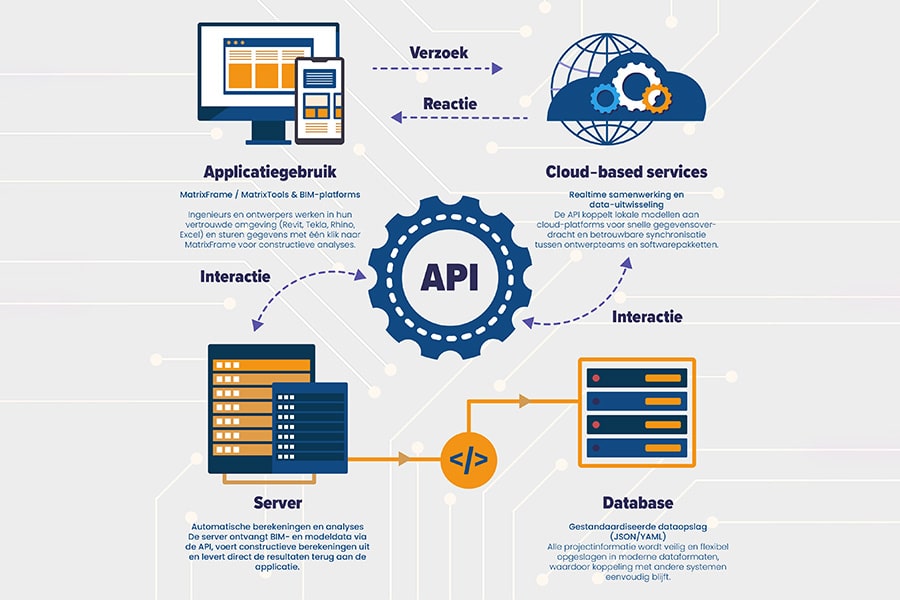
Increased productivity: Automate data entry and analysis processes across different platforms, giving you more time to focus on the creative and technical aspects of your design. Integration with Revit, Excel, Grasshopper, Rhino, and Dynamo allows teams to easily exchange data and collaborate in real time.
Improved accuracy: By eliminating manual data entry, you minimize the risk of errors and ensure that your designs are always accurate. With command line and C# support, you can set up advanced workflows, further reducing the risk of human error.
Better cooperation: The integration of MatrixFrame/MatrixTools with platforms such as Revit, Rhino, and Excel enables teams to collaborate more efficiently, share data in real time, and make design decisions faster. Two-way synchronization between Revit and MatrixFrame/MatrixTools keeps your models up to date at all times.
Optimized workflows: Whether you work with BIM software such as Revit, parametric design in Rhino/Grasshopper, or computational design with Dynamo, the Matrix Software API ensures that all your tools work together seamlessly, giving you more time for innovation and refinement of your designs. You can create dynamic models in Rhino and send them directly to MatrixFrame/MatrixTools for structural analysis with real-time feedback.
Flexibility in data management: Thanks to the ability to work with YAML and JSON files, you gain additional flexibility in managing data, allowing you to further tailor your processes to the needs of your project. This provides standardized, flexible data.
exchange and makes it easier to adjust configurations and manage data.
The Matrix Software API provides you with the tools you need to take your structural design processes to the next level. “Whether you work with Revit, Excel, Rhino, Grasshopper, Dynamo, or YAML or JSON files, our API offers extensive interoperability,” concludes Omary. “This allows you to focus entirely on designing the structures of the future!”
Neem dan rechtstreeks contact op met Matrix Software.
 Contact opnemen
Matrix Software is an independent Dutch software house specializing in construction automation. We provide software and services to structural engineers, concrete plants, steel builders and frame manufacturers. With 43 employees we develop, sell, deliver and support our automation solutions. We do this from offices in Nijmegen and Winterswijk and Vilnius (Lithuania). Since 1983, we have focused on specialized business [...]
Bekijk Bedrijfsprofiel