










Easy structural calculations
Software & Automation | According to Patty Schutte of Mile17, the universal structural analysis programme PC-Frame remains exceptionally popular. The software is being used in an increasing number of sectors.
According to Patty Schutte of Mile17, the universal structural analysis programme PC-Frame remains exceptionally popular. The software is being used in an increasing number of sectors. Schutte says this is thanks to the programme’s simplicity: it performs structural calculations in a flat 2D plane. We discuss the latest developments and updates.
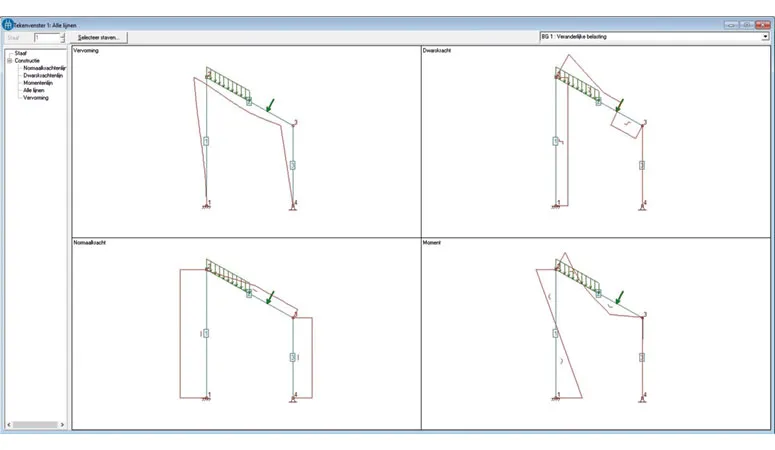
“Eighty per cent of structural calculations are carried out in a flat 2D plane,” Patty Schutte begins. “It is quite striking that software for structural engineers is becoming increasingly extensive and complex. We deliberately keep PC-Frame simple and accessible.” PC-Frame calculates support reactions, deflections, bending moments, shear forces and axial forces in flat, two-dimensional frames. The programme can also be used to analyse structures such as trusses, continuous beams, portals and arches. “Thanks in part to its simplicity, our programme is becoming increasingly popular in sectors beyond construction,” Schutte says. “PC-Frame is widely used for structural calculations in civil engineering, the maritime sector and mechanical engineering. PC-Frame is also well known in education, where students use it to complete assignments. An educational version has been developed specifically for this purpose. It includes all the functions, but adds a watermark to the calculations.”
Version 6
The method used to analyse structures in PC-Frame is linear elastic. “The structure is drawn on screen in a straightforward way,” Schutte explains. “The supports are then specified and the loads applied. We recently released version 6, which has been extensively tested under Windows 10 and approved. Customers can download this version from our website. In this latest version, we have given even more attention to entering loads, an important aspect for structural engineers. PC-Frame already allowed users to convert a uniformly distributed load on a surface into a line load by entering and saving the span height. The latest version also allows the self-weight of a member to be entered as a load. The weight per linear metre is calculated automatically based on the density and cross-section.”
New features in the mobile application
Mile17 has also released a mobile application for carrying out simple structural calculations on site using a smartphone or tablet. “This online calculation tool is completely free. The website makes it easy to calculate a beam supported at two points. Users can also select a steel section directly from the Eurocode section range and determine the load based on Eurocode 1. We will soon expand the web application to include the option of carrying out a buckling calculation.”
Patty Schutte reveals that PC-Frame will be integrated with the online tool in the near future. “We want to create a close integration that allows users to transfer PC-Frame results to the online calculation tool.”
Text: Roel van Gils | Image: Mile17
Vraag over dit verhaal? Stel je vraag
Blijf dit volgen
Bij een nieuw verhaal krijg je een e-mail. Geen account nodig.
- ThemaDigitaal van ontwerp tot montage
- OnderwerpSoftware & automation